Book review: “The LEGO Engineer” by Jeff Friesen

Affiliate link: https://amzn.to/3BN1S8o
Non-affiliate link: https://nostarch.com/lego-engineer
Disclaimer: I received a free pre-release review copy from No Starch Press.
I highly enjoyed The LEGO Engineer, by Jeff Friesen. The book consists of high level categories of engineering (Bridges and Tunnels, Trains and Beyond, Things That Float, Flying Machines, Amazing Buildings, Space Travel), with various examples of each category. These examples have detailed explanations of the mechanics behind them, as well as instructions for a LEGO model thereof.
A large part of engineering is dealing with tradeoffs; there is rarely one perfect design, and this book does a great job of explaining the pros and cons of each design. For instance, with bridges the author gives the example that cantilever bridges can carry heavier loads with wide spans, but they’re complex to build and more expensive than simpler designs.
Each example flows logically from one to the next; generally the design that’s introduced builds upon or improves on the one that was just shown. For instance, the steam train is followed by diesel-electric (hybrid that seems virtually strictly superior to steam), which is followed by Shinkansen train (much lighter than diesel-electric because they get their electricity from overhead lines rather than heavy engines, allowing them to be more efficient). The examples also include dates of introduction or service, which gives a nice historical overview of the developments.
Each engineering example comes with a micro-scale (not precisely defined in this text, but in such a scale the typical minifigure would appear like a giant) model, parts list, and instructions. The parts list includes the exact piece numbers so that you can order them from a site like bricklink.com. The introduction to the book points out that if you don’t have the exact pieces, you can often make substitutions as long as the dimensions are the same (e.g. if you need a 2×1 piece, it doesn’t matter if you use the standard 2×1 or one with a brick texture); in cases where this isn’t true or it’s likely you’d get confused, the author helpfully calls out a warning. For instance, in the Cruise Ship, there is a non-standard jumper plate that would not behave the same way as the more common model; the two plates look identical from above and differ only in the bottom.

Here’s a screenshot of Bricklink.com illustrating the difference:

The models are generally of high quality and aesthetically pleasing. There are some clever parts uses, such as a feather to represent smoke:
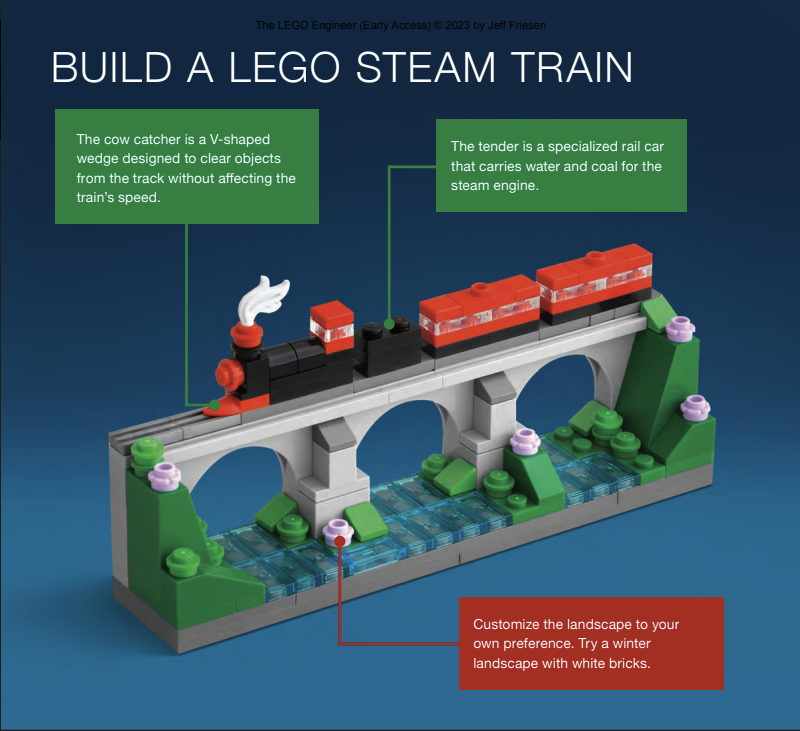
Or a small technic gear element to represent the cutting head of a tunnel boring machine:
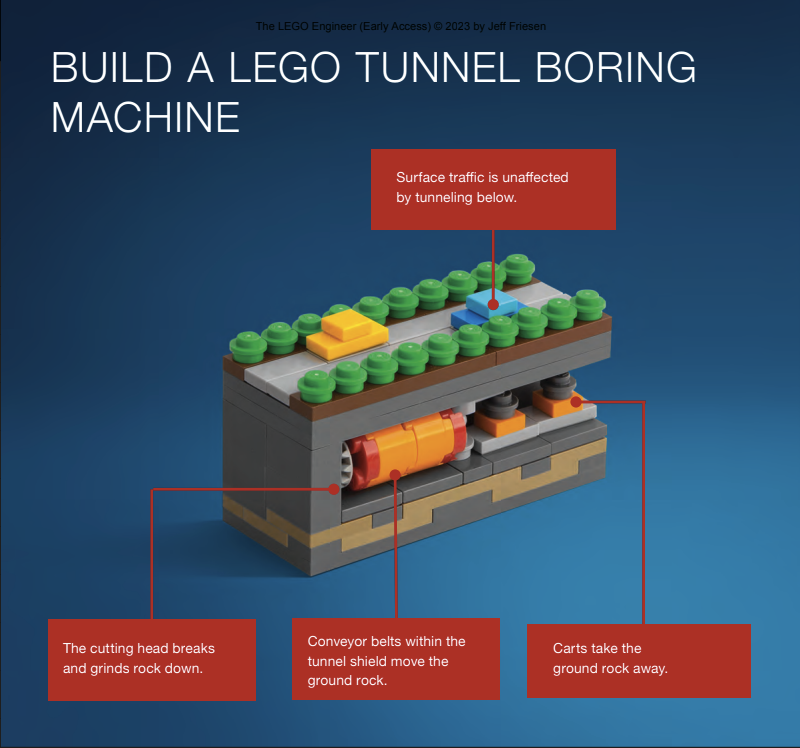
From just these two examples you can see the high-quality photos (or renders, I can’t really tell). The tunnel boring machine is a good example of micro-scale – whereas a typical LEGO car would be at least 4 studs wide, here a car is reduced to 1 stud wide and 2 long. When done successfully, it provides the ability to cover huge areas in small models.
Not every model works for me, particularly the Titanic model. Here is the finished product:

And a diagram of the Titanic from the previous page:

The distinctive elements are all present (4 smoke stacks, 2 antennae, color scheme), but in my opinion it is not a very good likeness. I believe the problem is in the proportions of the model. This model appears to be about 16 studs long and 2.5 studs wide, for a length/width ratio of 6.4. The real Titanic was proportionally much longer – approximately 882 feet by 92 feet, or length/width ratio of 9.6.
Contrast this example with the International Space Station, which is much smaller in real life, yet much bigger as a LEGO model. This extra space allows the author to achieve a much more convincing likeness:

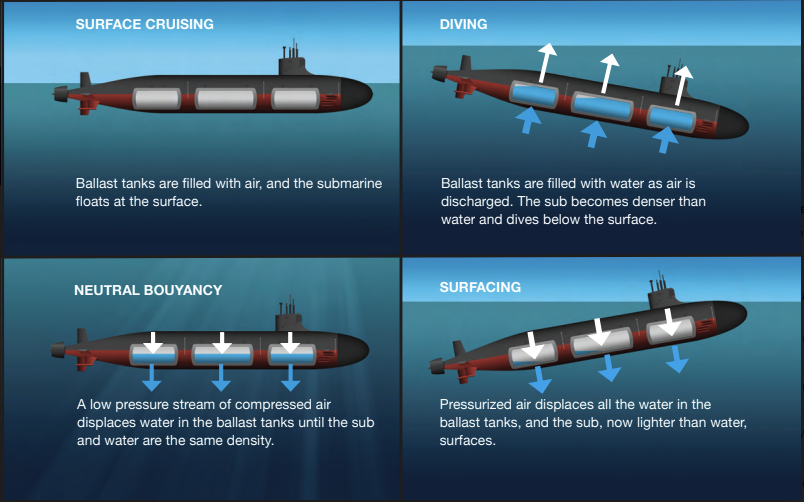
There are many helpful (non-LEGO) illustrations throughout the book; I found them consistently high quality. Here’s an example of how a submarine ballast tanks work in order to allow the ship to dive and later surface:
Perhaps the most interesting parts of the book to me were the examples of engineering challenges that were solved in unexpected ways, or cross-pollination across disciplines. For example, the Shinkansen train was initially shaped like a bullet, which caused problems exiting tunnels. Eiji Nakatsu developed a new nose shape inspired by the bill of the kingfisher bird; the text indicates this solved the tunnel problem and reduced air resistance substantially. Another example is that the hovercraft was invented by a radio engineer.
Overall, I think this book is a good purchase for anyone who is interested both in LEGO and engineering. The positives (logical sequencing, interesting engineering explanations with diagrams, by and large aesthetically pleasing LEGO models with detailed instructions) far outweigh the minor complaints I have (a few models which suffer from scale issues or otherwise don’t look convincingly like the thing they are trying to portray).
HTML/CSS tips to reduce use of JavaScript
https://calendar.perfplanet.com/2020/html-and-css-techniques-to-reduce-your-javascript/
Great article with examples of uses of JacaScript and how they can be replaced with HTML or CSS. I had no idea these techniques were available
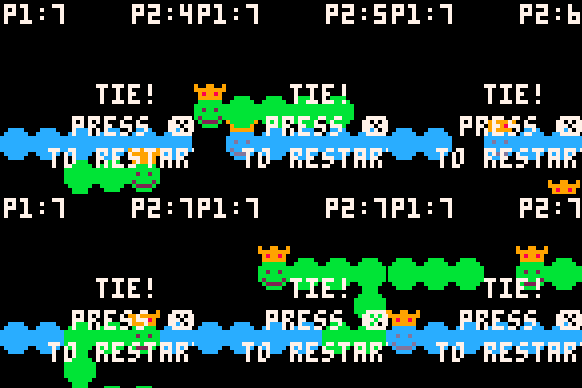
I made another game – Worm Game!
I took part in the “LOWREZJAM 2019” on itch.io – the challenge was to create a game in 2 weeks, with a maximum resolution of 64×64 pixels. My entry can be found at https://i82much.itch.io/worm-game. It was a lot of fun and a good learning experience – I’ve never used PICO-8 before, and it’s only the second ‘real’ game I’ve released (see my previous Rocket Runner game if you’re interested).


rstripping Simon Pegg: Don’t use rstrip for file extension removal
In Python, what does '/path/to/my/simon_pegg.jpeg'.rstrip('.jpeg') yield?
If you guessed '/path/to/my/simon_pegg' – good try, but not quite right. The real answer is '/path/to/my/simon_'.
Despite what you might intuitively think, rstrip does NOT strip off a substring from the end of a string. Instead, it eliminates all of the characters from the end of the string that are in the argument. (Note that this is not mutating the string; it returns a copy of the string.)
Since pegg contains the characters that are in .jpeg, it is eliminated as well.
While this behavior is documented, it may be surprising.
Why does it matter? There are many instances of people attempting to use this rstrip approach to strip off a file extension. For instance, you might be converting an image from one filetype to another, and need to construct the final path. Or you might want to rename a bunch of files to have consistent extensions (jpeg → jpg).
This buggy implementation of stripping a file extension is tricky because most of the time it works – but it works by coincidence (the file name happens not to end with the characters in the file extension).
Github is rife with examples of people making this same mistake. For instance,
main.py: name = str(name).rstrip(".tif")
fixname.py:os.rename(i.path,
i.path.rstrip('.gzip').rstrip('.gz') + '.gzip')
selector.py:l = [i.rstrip(".jpg") for i in k]
The Go language has the same semantics for its TrimRight function. This leads to the same sort of mistakes when people use it to trim file names. For instance,
filehelper.go: filename := strings.TrimRight(f.Name( ".pdf")
latest_images.go: idStr := strings.TrimRight(f.Name(), ".jpg")
The lessons to be learned from this are,
- Read the documentation of the library functions you use.
- Test your code, and not just of the happy paths. Good tests should try to break your implementation and exercise edge cases.
(Hat tip to my colleague Fredrik Lundh who alerted me to this problem and inspired this post)
Video: “Meet Spot, the robot dog that can run, hop and open doors”
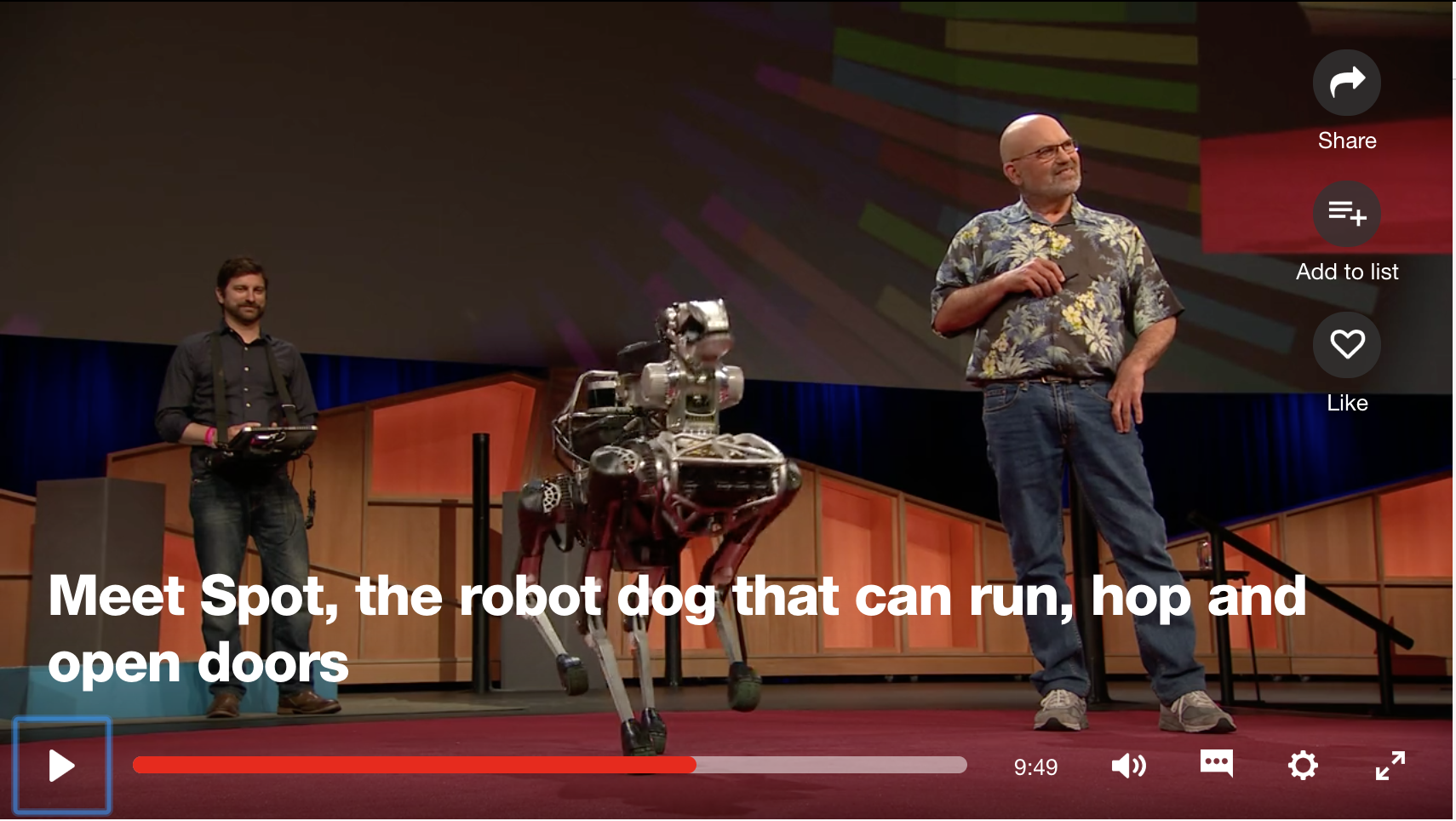
This is an incredible video. When I worked on a robotics team in college, we had a hard enough time with the four legged Sony AIBO robots on a fixed field with fixed landmarks. In this live demo, they show the dog pathfinding and adapting to changing terrain in real time. Inspiring engineering
I made a game – Rocket Runner is live now!
After months of Coursera classes in game design, I just finished the capstone project – an eight week course to build a game from scratch. I built the game Rocket Runner using Unity. You can play it now on Kongregate. I hope to put it in the iOS and Android app stores in the next few weeks.

I hope you enjoy! Let me know what you think in the comments.
Link: graphics analysis of Deus Ex: Human Revolution

Screenshot from the article showing normal map generation
http://www.adriancourreges.com/blog/2015/03/10/deus-ex-human-revolution-graphics-study/
This is one of the best presentations I’ve ever seen. Each step of the rendering pipeline is explained clearly, and the animated transitions between the screenshots are incredible. I can’t wait to read more from this author.
Your update is not more important than my work
I love TextMate, but I just saw the most user-hostile, infuriating thing. I’m doing work when all of a sudden I get the pop-up:

TextMate forced update
It closed my document (thankfully giving me a chance to save), and now the program refuses to launch until updated.
sigh
Link: At Chipotle, How Many Calories Do People Really Eat?
This article makes good use of histograms to display distributions rather than just standard descriptive statistics like “average”. For those who haven’t taken much math or haven’t been exposed to these sorts of distributions, the author also picks out certain points along the cumulative frequency distribution chart to explain what they mean; for instance only 10 percent of meals have less than 625 calories.
For many data sets (especially non-normal ones that arise in social networks, arithmetic mean (sum and divide by the number of elements) is a gross approximation of the real central tendency. See Ed Chi’s great article about this subject. (Full disclosure: I have worked with Ed at Google)
Link: “A female computer science major at Stanford: “Floored” by the sexism”
Choice quote:
When a boy – let’s call him Rush (like Rush Limbaugh) — heard my friend had interned at Facebook, his mouth dropped. “Wow! Facebook! You must be really smart!” He then turned to me and asked the exact same question: What did you do this summer?
Except when I responded the same — “Facebook” — I got a completely different response. “Oh… well then I should have applied for that internship.”
Terrible. Also terrible is the treatment she received during her internships:
My high-pitched voice also became an unexpected source of frustration as team meetings became small battlegrounds for respect. At another company (which I prefer not to name), I noticed that management listened more to what my male counterparts had to say even though I was offering insightful feedback. Managers asked my male coworkers about the status of projects, although I was touching all the same files. The guys were praised more on their progress although I was pushing the same amount of code.
We as an industry have to stop this nonsense.
Stack Overflow profile

 Developmentality